

Setting Up a Workout with Undefined Rest
These instructions apply to PM5s and any PM3 or PM4 with Undefined Rest capability.
The Undefined Rest feature allows you to program an interval workout where the length of the rest time is not predetermined. This is helpful for workouts such as CrossFit workouts that combine indoor rowing/skiing with other activities. For instance, if your workout is to complete as many rounds as possible of 500m of rowing followed by five box jumps in a certain amount of time, you can use the undefined rest feature for capturing the time it takes you to do the box jumps. You would set up this workout on the Performance Monitor as follows:
- On the Main Menu, choose Select Workout.
- Select New Workout.
- Select Intervals: Distance. The Intervals: Distance screen will display the default settings of 500m distance and 1:00 minute of rest time.
- Select the right arrow until “Set Rest Time” is blinking on the screen.
- Select the plus button. “Undefined Rest Time” is displayed.
- Select the checkbox icon and begin your rowing/skiing interval.
Continue rowing/skiing until the monitor prompts you to stop. This is the beginning of your first undefined rest time where you will complete the box jumps. When you are ready to start the next interval, select Continue and resume rowing/skiing.
When you have completed all intervals, press Menu or Menu | Back until the Main Menu is displayed.
Notes:
- Undefined rest can be up to 10 minutes in length.
- You can program up to 29 undefined rest intervals.
- It is not possible to save undefined rest interval workouts as favorites or custom workouts.
- If you ReRow/ReSki an undefined rest interval workout, the rest time will be defined by the amount of rest time you had when you originally did the workout, rounded down to the nearest five seconds.
- You can also set up time and variable interval workouts with undefined rest intervals. See the CrossFit Workout Examples below for how to set up a variable interval workout with undefined rest.
Reviewing Results for Undefined Rest Interval Workouts
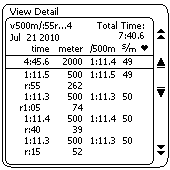
When reviewing results for undefined rest interval workouts, keep the following in mind:
- Total Time (upper right corner) shows total elapsed time (work plus rest times).
- On the summary line, time is the sum of the work and does not include rest time.
- The r:55 262 indicates that the rower/skier continued rowing/skiing after the monitor indicated for them to stop. As a result 262 meters were completed during the rest time.
- The last interval may show a small amount of time with zero meters. This is to accommodate a software design limitation and ensures that the Total Time value for the piece is accurate.
CrossFit Workout Examples
These examples feature two CrossFit workouts—a modified Helen and a Rowing Fran—and illustrate how to set up a variable interval workout with undefined rest intervals.
Modified Helen Workout
- Row 1200 meters
- 63 Kettlebell swings
- 36 Pull-ups
- Row 800 meters
- 42 Kettlebell swings
- 24 Pull-ups
- Row 400 meters
- 21 Kettlebell swings
- 12 Pull-ups
Setting Up the Monitor for Helen
- From the Main Menu go to Select Workout > New Workout > Intervals: Variable and set up the intervals as follows:
- Interval 1: Select Distance.
Set to 1200 meters and undefined rest. - Interval 2: Select Distance.
Set to 800 meters and undefined rest. - Interval 3: Select Distance.
Set to 400 meters and undefined rest.
- Interval 1: Select Distance.
- Select No more intervals.
- Row 1200 meters.
- Stop rowing and complete the Kettlebells and pull-ups.
- Return to the indoor rower and press Continue.
- Row 800 meters.
- Stop rowing and complete the Kettlebells and pull-ups.
- Return to the indoor rower and press Continue.
- Row 400 meters.
- Stop rowing and complete the Kettlebells and pull-ups.
- Press Menu or Menu | Back and review the results.
Rowing Fran Workout
Complete five rounds of the following for total time:
- 21 thrusters, 21 pull-ups, 200 meters rowing
- 18 thrusters, 18 pull-ups, 200 meters rowing
- 15 thrusters, 15 pull-ups, 200 meters rowing
- 12 thrusters, 12 pull-ups, 200 meters rowing
- 9 thrusters, 9 pull-ups, 200 meters rowing
Setting Up the Monitor for Fran
- From the Main Menu go to Select Workout > New Workout > Intervals: Variable and set up the intervals as follows:
- Interval 1: Select Time.
Set to 0:20 seconds with undefined rest. This is necessary so that the PM4 can count the time for your first interval of thrusters and pull-ups. - Interval 2: Select Distance.
Set to 200 meters with undefined rest. - Interval 3: Select Distance.
Set to 200 meters with undefined rest. - Interval 4: Select Distance.
Set to 200 meters with undefined rest. - Interval 5: Select Distance.
Set to 200 meters with undefined rest. - Interval 6: Select Distance.
Set to 200 meters with rest time of 0:00. This is necessary so that the timer stops as soon as you finish your last 200m row.
- Interval 1: Select Time.
- When you see Interval 7 on the monitor. Select No more intervals.
- When you are ready to start, give the handle a tug to get the timer going.
- Do 21 thrusters and 21 pull-ups.
- Press Continue and then row 200 meters.
- Do 18 thrusters and 18 pull-ups.
- Press Continue and then row 200 meters.
- Do 15 thrusters and 15 pull-ups.
- Press Continue and then row 200 meters.
- Do 12 thrusters and 2 pull-ups.
- Press Continue and then row 200 meters.
- Do 9 thrusters and 9 pull-ups.
- Press Continue and then row 200 meters. At the end of the 200m the machine will stop counting and store your results.