

Setting Up a Biathlon
 Biathlon combines two sports: typically Nordic skiing and target shooting. Races generally consist of three or five laps, with a shooting stage (“range”) between each lap. A penalty is assessed for each missed shot. Most often, this is a penalty lap of 150 extra meters of skiing.
You can use the Biathlon Workout to ski or row intervals alternating with target shooting or some other activity. You can choose from several penalty distances, or no penalty at all:
- With penalty: Penalty distances are calculated after each range interval and must be completed before the next interval begins.
- Without penalty: No penalty distances are calculated. You will simply have an undefined rest time of up to 10 minutes between your intervals.
The computer keeps track of your range time and your total elapsed time. Penalty laps show up on the logged workout detail as a separate interval with zero rest. You can Re-Ski or Re-Row the workout, but penalty intervals and range time will be exactly as they were when you completed the workout originally.
To set up a Biathlon, from the Main Menu choose Select Workout > New Workout > Special > Biathlon.
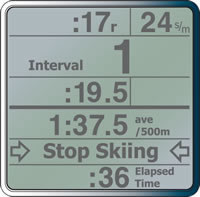
During set up, choose the number of intervals you want (from 2 to 15), the interval length, and whether you want a penalty (choose from none to 250m in 50m increments). Do your first interval. When you complete it, the rest or range time begins, and the PM will prompt you to stop skiing or rowing. Once you’ve stopped, the penalty screen will appear on the PM:
- Playing with penalty: After completing your range time, press the button that corresponds to the number of penalties you incurred (from 0 to 5). For example, if you were shooting, choose the number of shots missed. The PM calculates the penalty distance based on what you selected during set up (selected penalty increment multiplied by the number of penalties/shots missed equals the penalty lap distance). Do the penalty lap. When you are done, your next interval begins.
- Playing without penalty: Simply press Continue when you are ready to begin your next interval.
Notes:
- Only PM3s running PM3 Firmware Version 303 or higher include Biathlon.
- On PM3s and PM4s, the menu path for setting up a Biathlon starts at the Main Menu and is Games > More Games > Biathlon.