

How to Participate
All of our online challenges are run through the Concept2 Online Logbook—a free web-based application that allows you to record your workouts, track your total meters and, if you choose, compare your times with other participants from around the world.
Once you achieve the challenge goal, you’ll be able to download a certificate of participation or purchase items such as T-shirts and mugs. If you like, you can also have your name included on the challenge honor board!
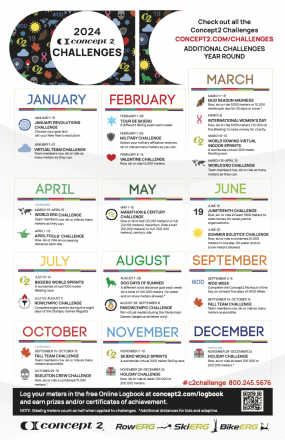
For more information about each challenge, visit the Challenge Information section of the Logbook, or click on the challenge name below. You can also download a Challenge Calendar.
Challenges for Individuals
To participate in an individual challenge, you just need to create an online logbook and record your meters in it.
| Challenge | Dates | Type | Description |
|---|---|---|---|
| January Revolutions | Jan 1–31 | Row/Ski/Ride | Pick your goal and then try and stick to it! |
| Tour De SkiErg | Feb 1–28 | Ski | A different event challenge each week |
| Military Challenge | Feb 1–28 | Row/Ski/Ride | If you're in a military affiliation, help them row, ski or ride as many meters as possible |
| Valentine Challenge | Feb 9–14 | Row/Ski/Ride | Complete a total of 14,000m |
| Mud Season Madness | Mar 1–31 | Row/Ski/Ride | Do 5000m or 10,000m meters each day for 25 days or more |
| International Women's Day | Mar 8 | Row/Ski/Ride | Do a 5,000m piece (10,000m on the BikeErg) to raise money for charity. |
| April Fools' | Apr 1–15 | Row/Ski/Ride | Complete an increasing distance every day from April 1 to April 15. |
| Global Marathon | May 1–15 | Row/Ski/Ride | Row or ski either a full (42,195m) or half (21,097m) marathon, or ride for 100,000m or 50,000m, all in one workout |
| Juneteenth | Jun 19 | Row/Ski/Ride | Help raise money for non-profit organizations |
| Summer Solstice | Jun 20 | Row/Ski/Ride | Aim to do at least 21,000 meters |
| Rowlympics | Jul 23–Aug 3 | Row | Row throughout the Olympics and see if you can win a Rowlympic medal! |
| Dog Days of Summer | Aug 1–28 | Row/Ski/Ride | A different distance goal each week throughout August |
| PaRowlympics | Aug 28–Sep 8 | Row | Row throughout the Paralympics and see if you can win a PaRowlympic medal! |
| WOD Week | Sep 3–9 | Row/Ski/Ride | Complete the Concept2 Workout Of the Day on at least five days of WOD Week |
| Skeleton Crew | Oct 25–31 | Row/Ski/Ride | Complete at least 31,000 meters |
| Holiday Challenge | Nov 28–Dec 24 | Row/Ski/Ride | Try for the 100,000 meters or 200,000 meter level |
Challenges for Teams
To take part in team challenges, you’ll need to join a team. To find one, click on the Teams link in your Online Logbook or visit the Concept2 Training Forum to find a team recruiting members. Alternatively, you can set up your own team for others to join. For more information on teams, including more on how to set them up, see the FAQ section of the Online Logbook.
| Challenge | Dates | Type | Description |
|---|---|---|---|
| Virtual Team Challenge | Jan 1–31 | Row/Ski/Ride | Complete as many meters as you can during the timeframe indicated |
| World Erg Challenge | Mar 15–Apr 15 | Row/Ski/Ride | Complete as many meters as you can during the timeframe indicated |
| Fall Team Challenge | Sep 15–Oct 15 | Row/Ski/Ride | Complete as many meters as you can during the timeframe indicated |
Other Events
As well as our Challenges, there are also a number of other events throughout the year that use the Logbook. These include the Virtual World Rowing Indoor Sprints, a collaboration with World Rowing, that sees people from all over the world row 1000m. Unlike a traditional race, the Virtual World Rowing Indoor Sprints can take place anywhere in the world. You can take part on your own or in an organized event!
| Challenge | Dates | Type | Description |
|---|---|---|---|
| World Rowing Virtual Indoor Sprints | Mar 6–10 | Row | A worldwide virtual 1000 meter race on the RowErg. |
| BikeErg World Sprints | Jul 10–14 | Ride | A worldwide virtual 1000 meter race on the BikeErg. |
| SkiErg World Sprints | Nov 7–10 | Ski | A worldwide virtual 1000 meter race on the SkiErg. |